



AGON by AOC explains Motion Blur Reduction technologies: MBR, MBR Sync and MBR+
The world’s leading gaming monitor brand, in sales volume, is AGON by AOC, and thus we let the experts explain their suite of Motion Blur Reduction (MBR) technologies, exploring:
- how they work
- when to use them, and
- how they compare to other solutions on the market.
As refresh rates climb beyond 500 Hz and competitive gaming demands ever-sharper motion clarity, backlight strobing has become an essential tool for serious players. AGON by AOC has developed three distinct implementations:
- MBR
- MBR Sync and
- MBR+
each designed for different use cases and performance levels.
How does motion blur occur on LCD monitors?
Faruk Bekdemir, Technical Product Specialist Gaming & B2C at AGON by AOC, explains:
“LCDs use what’s called ‘sample-and-hold’ technique, where each frame stays visible until the next one arrives. Your eyes track a moving object, but the pixels stay lit in place. That mismatch is what your brain perceives as motion blur, even if the panel’s response time is technically very fast.”
The solution is to reduce how long each frame is visible to the human eye.
MBR: The foundation
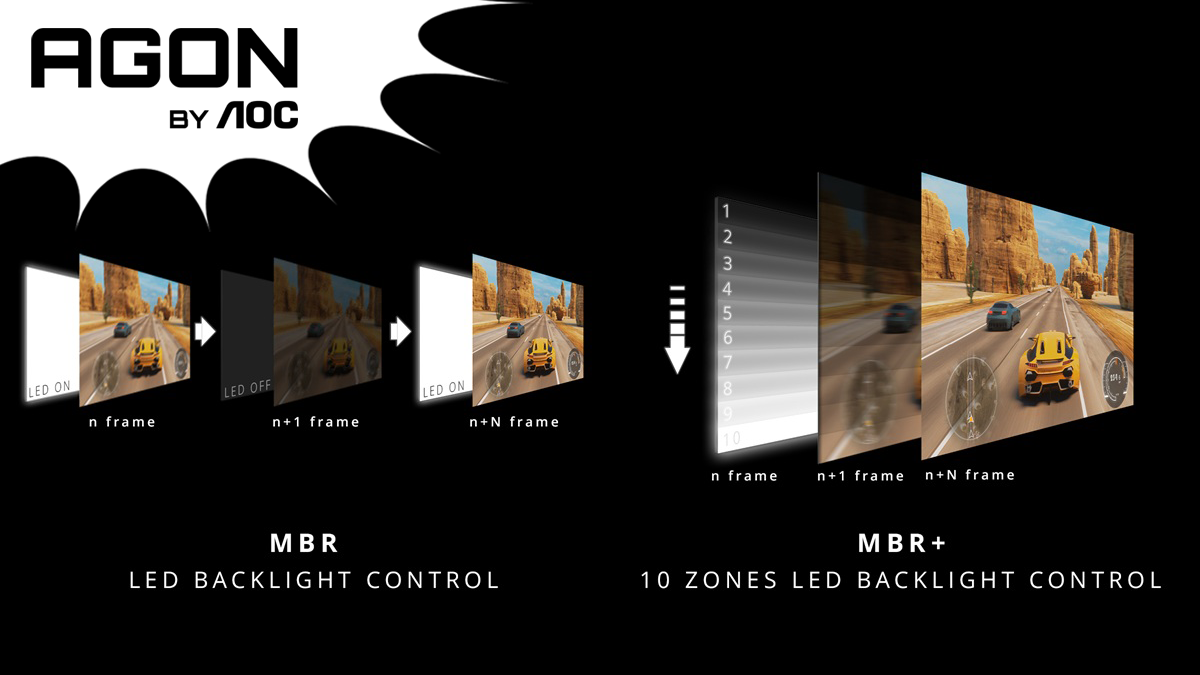
AGON by AOC’s standard MBR is a global backlight strobing technology. The backlight turns off while pixels transition, then strobes briefly to illuminate only the fully rendered frame. Bekdemir continues:
“On most of our gaming monitors, MBR offers a slider from 1 to 20. Lower settings give you more brightness; higher settings give you sharper motion clarity but a dimmer image. Most users find the sweet spot around 10 to 14.”
MBR requires a fixed refresh rate and cannot operate simultaneously with VRR (FreeSync or G-SYNC Compatible). It’s ideal for players who can consistently hit their target frame rate and want maximum clarity.
MBR is available across the AOC GAMING G4 series, including models such as the 24G42E, 25G42E and 27G42E (Full HD, 180 Hz) models.
MBR Sync: Strobing meets variable refresh rate
MBR Sync addresses a common frustration: having to choose between tear-free VRR gameplay and motion-blur-free strobing.
“With MBR Sync, we synchronise the backlight strobe with the variable refresh rate output,” Bekdemir explains. “You get the benefits of variable refresh rate, no tearing, no stuttering, while also reducing perceived motion blur. It’s a practical solution for players whose frame rates fluctuate during gameplay.”
MBR Sync is featured on most recent AOC GAMING models, including the newest 24G4ZR and 27G4ZR with 260 Hz (OC), the latest Mini-LED Dual-Mode monitors such as the U27G4XM (160 Hz @ 4K, 320 Hz @ FHD), or other high-refresh models in the G4 portfolio such as the 25G4SRE (300 Hz, Full HD), Q25G4SR (300 Hz, QHD), 25G4KUR (400 Hz, Full HD).
“Across the AOC GAMING G4 and AGON PRO series, MBR performance scales with refresh rate: monitors running between 144 Hz and 220 Hz achieve 0.5 ms MPRT, while 240 Hz and above deliver an even sharper 0.3 ms MPRT”, Bekdemir adds.
MBR+: The next generation
Debuting on the AGON PRO AG246FK6 and CS24A (both 24.1″ FHD 610 Hz), MBR+ represents a fundamental leap in strobing architecture.
“Traditional MBR strobes the entire backlight at once. MBR+ uses a dual light bar system with 20 independent LED groups,” elaborates Bekdemir. “Each region strobes in sync with the panel’s scanout – so you get precise timing across the entire screen, not just the centre. The result is dramatically reduced strobe crosstalk and better uniformity from top to bottom.”
At 610 Hz with MBR+ engaged, these monitors achieve a specified 0.3 ms MPRT (Moving Picture Response Time), approaching the theoretical limits of LCD technology.
How does this compare to NVIDIA G-SYNC Pulsar?
AGON by AOC also offers the AG276QSG2, a 27″ 1440p 360 Hz monitor featuring NVIDIA’s G-SYNC Pulsar technology.
“Pulsar takes a similar regional approach to MBR+ but adds adaptive overdrive that adjusts per-region and per-refresh-rate,” Bekdemir explains. “It’s currently the most refined VRR-plus-strobing implementation available. For players who want both tear-free gameplay and exceptional motion clarity without switching modes, the AG276QSG2 with Pulsar is our flagship recommendation.”
| Feature | AOC MBR | AOC MBR Sync | AOC MBR+ | Nvidia G-SYNC Pulsar |
| Type | Global strobe | Global strobe + VRR | Rolling scan strobe | Rolling scan strobe + VRR |
| VRR Compatible | No | Yes | No | Yes |
| Strobe Zones | 1 (whole backlight) | 1 (whole backlight) | 20 LED groups | 10 horizontal stripes |
| Adaptive Overdrive | Fixed | Fixed | Fixed | Dynamic (per-region, per-Hz) |
| Strobe Crosstalk | Moderate | Moderate | Low | Very Low |
| Effective Clarity | Good at high Hz | Good with VRR enabled | Excellent at 600 Hz+ | Excellent (~4×) |
| Hardware Requirement | Standard scaler | Standard scaler | Dual light bar system | MediaTek scaler with G-Sync |
| Flicker Control | Fixed pulse timing | Variable timing | Region-synchronised | Dynamic pulse modulation |
Which technology should gamers choose?
“It depends on your setup and priorities,” says Bekdemir. “If you’re consistently hitting high frame rates in esports titles and want sharp clarity, MBR or MBR+ at a fixed refresh rate deliver excellent results. If your frame rate varies and you prefer tear-free gameplay, MBR Sync gives you strobing benefits while keeping Adaptive-Sync active. And for those who want the best of both worlds, Pulsar on the AG276QSG2 represents the current state of the art.”
Availability
AGON by AOC monitors featuring these technologies are available now through authorised retailers:
- AGON PRO AG246FK6 (24.1″ 610 Hz, MBR+) – £599 MSRP
- AGON PRO CS24A (24.1″ 610 Hz, MBR+, Counter-Strike 2 edition) – £599 MSRP
- AGON PRO AG276QSG2 (27″ 1440p 360 Hz, G-Sync Pulsar) – £559 MSRP
- AOC GAMING G4 series (MBR and MBR Sync) – starting from £100 MSRP